From dev-how.sbne.me
Countdown timer
Setup countdown timer reminder to ensure when to start pre service video to make sure that pre service videos end at service starting time.
- Check total pre service video run time in Propresenter (circled red below).

- Open Countdown timer application on task bar

- Add the total video run time from first step into “Queue counter” input box (circled red below) Select “Show queue overlay” (circled green below) Ensure that “Start time” for service start time is correct (circled blue below)
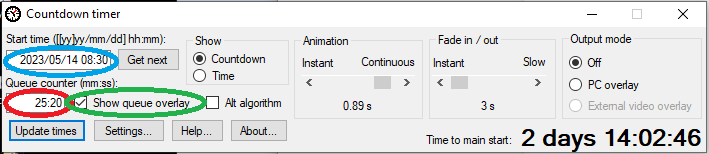
- Overlay countdown timer is now active in top right hand of PC screen. When 0:00, start the pre service video in Propresenter by selecting the first video.