No edit summary |
No edit summary |
||
| Line 5: | Line 5: | ||
=== Creating new user === | === Creating new user === | ||
Users belonging to usergroup bureaucrat can create new users by selecting the Gear icon and Selecting Special pages | Users belonging to usergroup bureaucrat can [[Special:CreateAccount|create new users]] by selecting the Gear icon and Selecting Special pages | ||
<pic src="/images/1/18/Specialpages.png" width=75% align=text caption="Special pages" /> | <pic src="/images/1/18/Specialpages.png" width=75% align=text caption="Special pages" /> | ||
Navigate to '''Users and rights''' and select '''Create account''' | Navigate to '''Users and rights''' and select '''Create account''' | ||
Complete new user creation and ensure that '''Select a temporary random password''' is selected to allow user to setup password upon first login. | Complete new user creation and ensure that '''Select a temporary random password''' is selected to allow user to setup password upon first login. | ||
Ensure that newly created user is assigned to at least the following group: | Ensure that newly created [[Special:UserRights|user is assigned]] to at least the following group: | ||
* <Campus name>-editors | * <Campus name>-editors | ||
Navigate to '''Users and rights''' and select '''User rights''' | Navigate to '''Users and rights''' and select '''User rights''' | ||
[[Special: | |||
=== Deleting a user === | |||
If a user account needs to be deleted, the [[Special:UserMerge|Merge and Delete]] action should be used. This ensures that all contributions made by user are merged to another user before account deletion. | |||
'''Old user (merge from)''' is the account to be deleted and '''New user (merge to)''' is Anonymous. | |||
Ensure that '''Delete old user''' is selected. | |||
Latest revision as of 18:56, 19 November 2024
Help for campus coordinators
Campus coordinators will have access to assist with user admin activities and belong to predefined usergroup called "bureaucrat".
The how wiki will send emails to users to communicate password reset and other activities as well as optional content addition notifications.
Creating new user
Users belonging to usergroup bureaucrat can create new users by selecting the Gear icon and Selecting Special pages
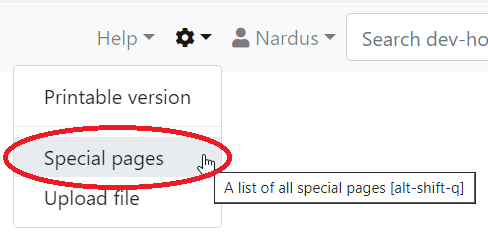 |
Special pages |
Navigate to Users and rights and select Create account
Complete new user creation and ensure that Select a temporary random password is selected to allow user to setup password upon first login.
Ensure that newly created user is assigned to at least the following group:
- <Campus name>-editors
Navigate to Users and rights and select User rights
Deleting a user
If a user account needs to be deleted, the Merge and Delete action should be used. This ensures that all contributions made by user are merged to another user before account deletion. Old user (merge from) is the account to be deleted and New user (merge to) is Anonymous. Ensure that Delete old user is selected.